How we built a product-first homepage without sacrificing performance or scalability
Learn how we replaced a static site with a dynamic, personalized homepage — powered by a new microservice, data mart-driven provider carousels, and state-level edge caching — driving a 6% increase in client intakes.
Infrastructure
·
7 min
This article was written by Diana Eastman, Cayla Hamann and Alla Hoffman
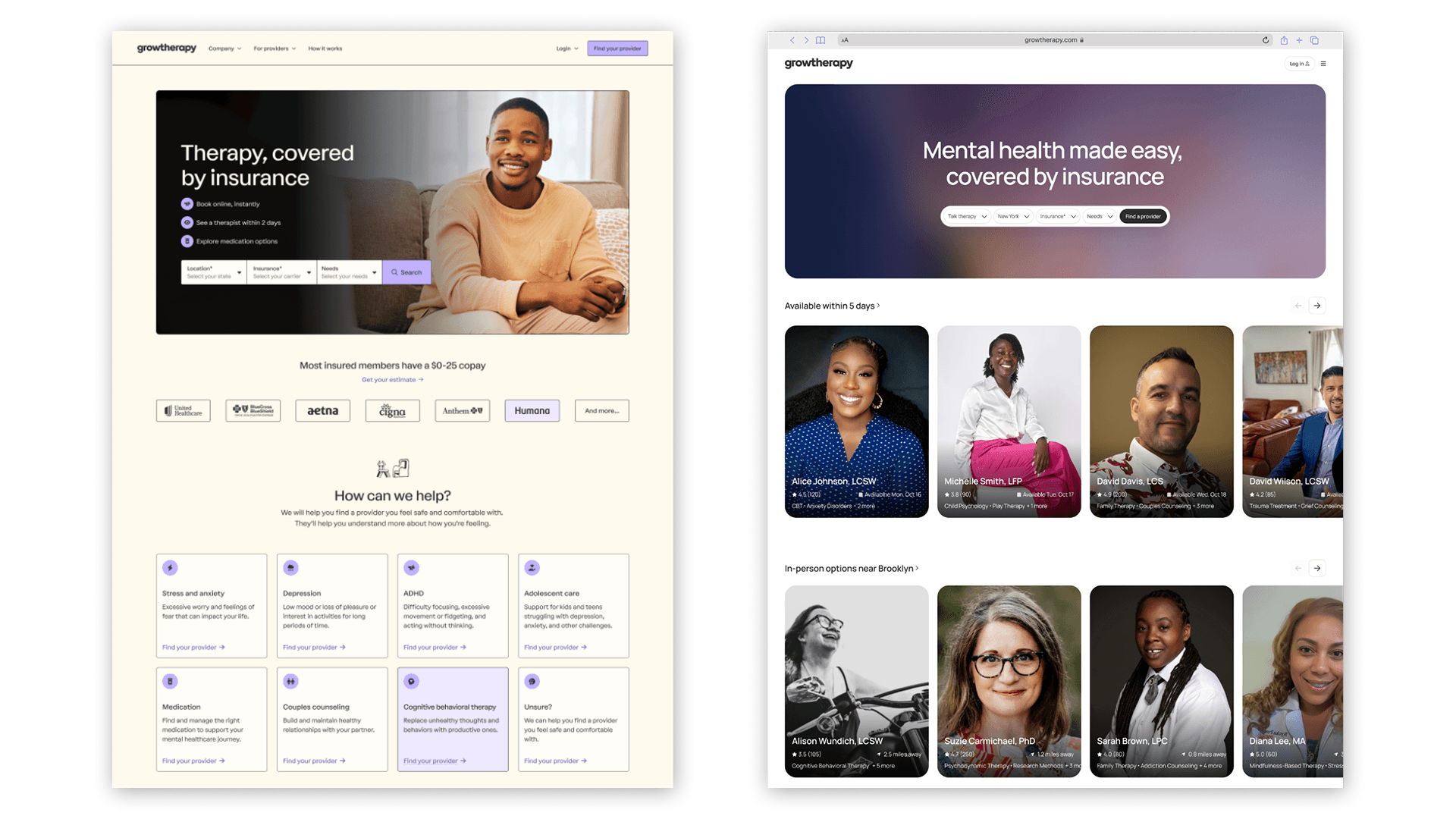
At Grow Therapy, we're on a mission to create a more accessible, reliable, and trusted marketplace for mental health across the US. In 2025, we saw an opportunity to sharpen how we bring this mission to life by reimagining our homepage. Specifically, we replaced our static WordPress site with a dynamic experience that puts clients directly into the product by surfacing provider recommendations upfront. Previously, visitors to the site had to run a search by selecting their state and insurance company before seeing a list of potential providers. We hypothesized that removing this friction would help our clients find and book a session more quickly.
A side-by-side comparison of our old and new homepage experience.
But building this experience wasn’t straightforward—providers are licensed at the state level, so we needed real-time geographic validation. Additionally, determining the best way to show and rank providers requires ongoing iteration, which meant designing the backend to allow product and data teams to experiment quickly.
In this blog post, we'll take a closer look at how we built this new experience quickly to meet these requirements, without sacrificing performance or stability.
Choosing our stack
Our product uses a monolithic architecture, which simplified our development, testing, and deployment processes when we built the core platform. However, as we scaled, we began to run into limitations. For instance, requests to the monolith flow through a GraphQL layer that provides flexibility but also introduces processing overhead, impacting latency at scale.
As a result, we have started building select services outside the monolith. Our first step was in early 2025, when we launched a small, internal-facing service as a pilot. The homepage redesign seemed like a natural next step. As a public-facing surface handling thousands of requests per minute, it needs the isolation, performance, and resilience that only a standalone service could provide.
We built on top of a standard service chassis that handles shared infrastructure concerns—logging, tracing, metrics, and CI/CD via GitHub Actions—so that each service can be spun up quickly and consistently without reinventing the wheel. We used a Python kernel as the foundational runtime layer, providing key functionality such as dependency injection, service startup/shutdown orchestration, abstractions for critical third-party services like Snowflake and Redis, and built-in support for workers and key protocols (e.g., Starlette for HTTP handling, Celery for asynchronous task processing, and EventBridge for event publishing). This foundation allowed us to standardize critical patterns, like dependency management, third-party integrations, and request handling, enforce good practices by default, and improve the testability and performance of our codebase.
For the frontend, we extended our existing server-side-rendered (SSR) React app. Given our desire to move quickly, we built on our existing frontend infrastructure to ship a reliable experience without introducing unnecessary complexity. SSR also gave us an added SEO benefit—since search engines can index pages without relying on client-side JavaScript, our homepage is indexed more quickly and accurately.
To improve performance, we paired SSR with edge caching so most requests are served directly from the CDN. Cache lifetimes are configurable on a per-page basis, allowing us to tune freshness and performance without redeploying code.
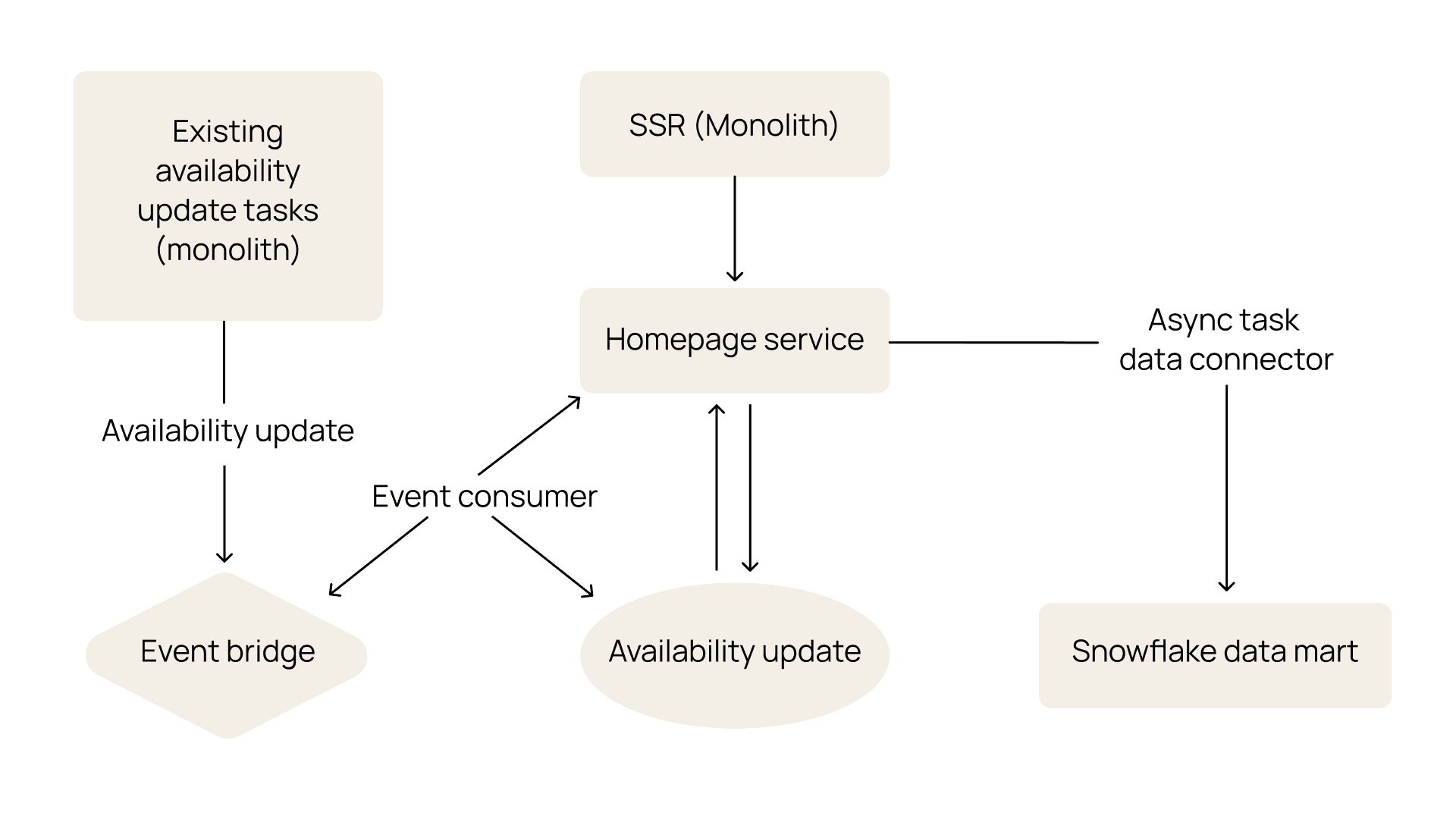
An architecture diagram of our new homepage experience.
Powering provider carousels with a data mart
A major component of the homepage redesign was surfacing relevant providers across different carousels (e.g., “Available this week in California” or “Get help for anxiety or depression”) to help clients find the right provider quickly.
A close-up of the provider carousels on our homepage.
This feature introduced a few considerations. First, we wanted to ensure that teams could easily run experiments on the carousel (e.g., which carousels to show) and ranking within them (e.g., how we order the carousels or rank the providers)—all driven by what we know about the therapists in our system and the clients searching for care. Second, our system needs to support filtering providers by state-level licensing and availability, so we only show clients the providers that they can actually book.
A data mart built on top of our Snowflake warehouse, originally designed for business intelligence, turned out to be a good fit to power this experience. It’s extensible enough to meet our requirements while giving product and data teams the flexibility to experiment without engineering involvement. We considered using our production database for fresher data, but any experiment would have required a code change, slowing us down in the long run.
We set up a series of asynchronous jobs to populate display-ready tables on our homepage service from the data mart. These tables define both the carousel categories and the ordered list of providers within each grouping. Each grouping is also associated with filters to ensure we’re showing it to the right set of users based on inferred location (from IP address). These jobs run on cadences ranging from every 5 minutes to every 30 minutes, meaning carousel composition eventually becomes consistent, while provider availability is updated in real time via our eventing system.
By separating data computation from application delivery, we’ve created a flexible, agile system where heavy ranking logic and eligibility calculations occur upstream in the data mart. This allows data teams to iterate on grouping and ranking logic while the homepage service simply reads from precomputed, display-ready tables.
Making provider carousels performant on the frontend
Our provider carousel experience introduced two performance questions:
How do we cache the dynamically generated homepage for each user?
How do we load provider cards performantly, supporting up to 64 high-resolution photos per page load?
In both cases, our approach was the same: optimize for the common case and accept—and, in some cases, come back to improve—suboptimal performance for the long tail.
Defining our caching strategy
We considered two extremes. We could serve a single global cached page; this would be fast but suboptimal for SEO, as search engines index server-rendered HTML more reliably than client-rendered content. On the other hand, we could serve a fully personalized, uncached page per user. While this approach is better for relevance, it would add significant latency, as we’d need to regenerate the homepage on every request.
We landed on a middle ground: cache by state. Our CDN (CloudFront) injects geolocation headers into each request, and we include the user’s US state in the cache key, allowing the CDN to maintain and serve a separate cached homepage for each state.
However, if a user requests a specific variant that isn't already cached, the page must be rendered on demand rather than served from cache, which can result in a slower response. That’s why we’ve invested in iterating on our performance strategy, including exploring levers like increasing TTL or enabling Origin Shield. As a result, we’ve improved our cache hit rate by 72%.
Loading provider images quickly
Our new homepage displays up to 8 carousels, each featuring 8 providers, so we needed to load up to 64 provider profiles (and their photos) on every page visit. Naively rendering all provider images at once would flood the initial page load with competing network requests, degrading performance metrics like First Contentful Paint (FCP)—a measure of how quickly users see the first piece of content on the page. A slow FCP hurts user perception, increases bounce rates, and negatively impacts SEO rankings.
We solved this by implementing an IntersectionObserver system that loads only what's visible to the client, minimizing the amount of elements we have to load on page load. A page-level observer detects when a carousel enters the viewport, and a card-level observer (only active once the carousel is visible) loads individual cards as clients scroll horizontally. As a result, we reduced the number of initial image requests from 50 to 5, which dramatically improved FCP but still didn’t meet our desired performance goal.
To close the gap, we optimized the way we loaded the images. We serve multiple formats (e.g., AVIF, WebP, and JPEG) and let the browser choose the most efficient option. Each image includes 1x and 2x srcset variants (so standard and retina displays receive appropriately sized assets) and is dynamically resized via a CDN-backed proxy with a safelist of allowed resolutions to maximize cache efficiency. We also use lazy loading to defer loading of offscreen images and specify explicit dimensions to prevent layout shifts, keeping the carousel fast and visually stable. Together, these optimizations improved FCP by 41%.
Rolling out the experience
Like any significant product change, we launched the new homepage as an A/B test, gradually rolling it out to validate our hypothesis and monitor for regressions in production. But given the sensitivity of the homepage surface, we had to go beyond a traditional A/B test and add safety mechanisms to ensure that, if something went wrong, we didn’t disrupt the user experience.
In practice, this meant using a Lambda@Edge function at the CDN layer that allocated users to an experiment group before the request reached our Next.js server, ensuring clients were always bucketed into the same group (and thereby saw a consistent experience). Every major homepage behavior (e.g., the page itself, image loading strategies, and visual variants) was toggleable via a feature flag, giving us fine-grained control in production—if a specific component caused problems, we could disable it without turning off the whole homepage experience. And if there was a broader issue (e.g., the homepage service was down), we added a fallback redirect to the static WordPress site so clients still had an entry point to the product.
We launched the experiment in December 2025, and after seeing positive results, quickly ramped it up to 100% of users. Specifically, the redesign drove a 6% increase in client intakes (i.e., the number of clients who booked their first visit with a provider), primarily due to a 11.7% increase in clients who went from the homepage to search for a provider. These results validate our hypothesis that quickly getting clients into the product increases the likelihood of booking a session, bringing them one step closer to the right care.
Looking forward
Our homepage redesign is just the beginning—we're excited to keep iterating and find new ways to reduce friction for clients seeking quality, reliable mental healthcare. If you're excited about owning real architectural decisions and solving meaningful problems in healthcare, we'd love to hear from you. Check out our careers page for open roles.