Building coach: Lessons from building a production-grade LLM system
Most LLM systems treat every job the same. We matched each component to the right control pattern, which helped us scale to a nationwide release. Learn more about why we took this approach and lessons for other teams.
AI & Machine Learning
·
4 min

This article was written by Tripp Roberts.
We recently launched coach, an AI tool that is designed to complement provider care and support clients between their therapy sessions.
While clients interact with coach through a familiar, single-threaded chat interface, the system does many different jobs to respond to users: applying safety guardrails, pulling in structured information, surfacing helpful resources, and taking administrative actions requested by users. These jobs have different requirements around reliability, timing, and control. For instance, safety guardrails need to run reliably on every message, whereas user-requested actions run only as needed.
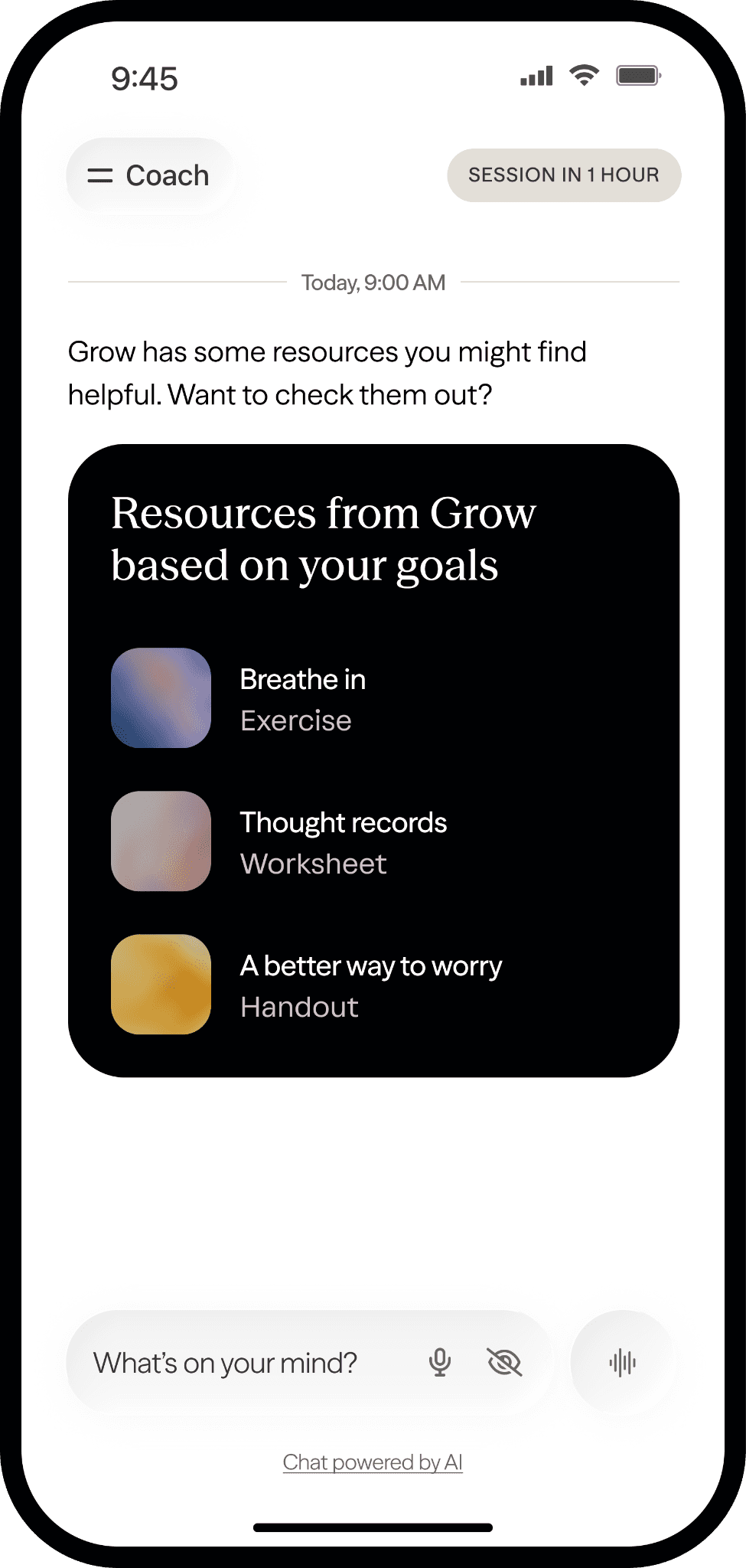
After every session, coach surfaces relevant resources for a client based on several factors, including their treatment goals.
In architecting coach, we decided to take a bottom-up approach. Rather than defaulting to a single agent architecture for everything, we matched each job to its own control pattern: parallel execution for safety guardrails, tool calls for contextual enrichment, and a validation layer to verify any actions that touch user state. This runs counter to the common approach of choosing a single architecture and applying it consistently. However, we've found that embracing this pattern creates a more resilient, maintainable, and scalable system in practice, especially in LLM systems where consistency of user experience is the most important requirement.
The early versions of coach’s architecture
Our initial implementation was intentionally naive: a single system prompt that analyzed context, responded to users, and performed our safety guardrail checks. This approach allowed us to quickly build a prototype that we could internally dogfood to validate core product and UX assumptions (e.g., nailing coach’s tone, the right UX paradigm for the messaging experience) before building out the full product.
With these assumptions validated, we moved to the next version of our system. Before we could put coach in front of real clients, we knew we had to overhaul our safety infrastructure to ensure we could isolate, test, and enforce our safety guardrails reliably. These guardrails serve a critical function: they detect language indicating users may be in elevated distress (such as those at risk of harming themselves or others) and ensure coach routes them to human support and the right resources. Getting this wrong has real consequences for our clients, and we wanted to minimize any risk of not properly supporting someone undergoing a real crisis.
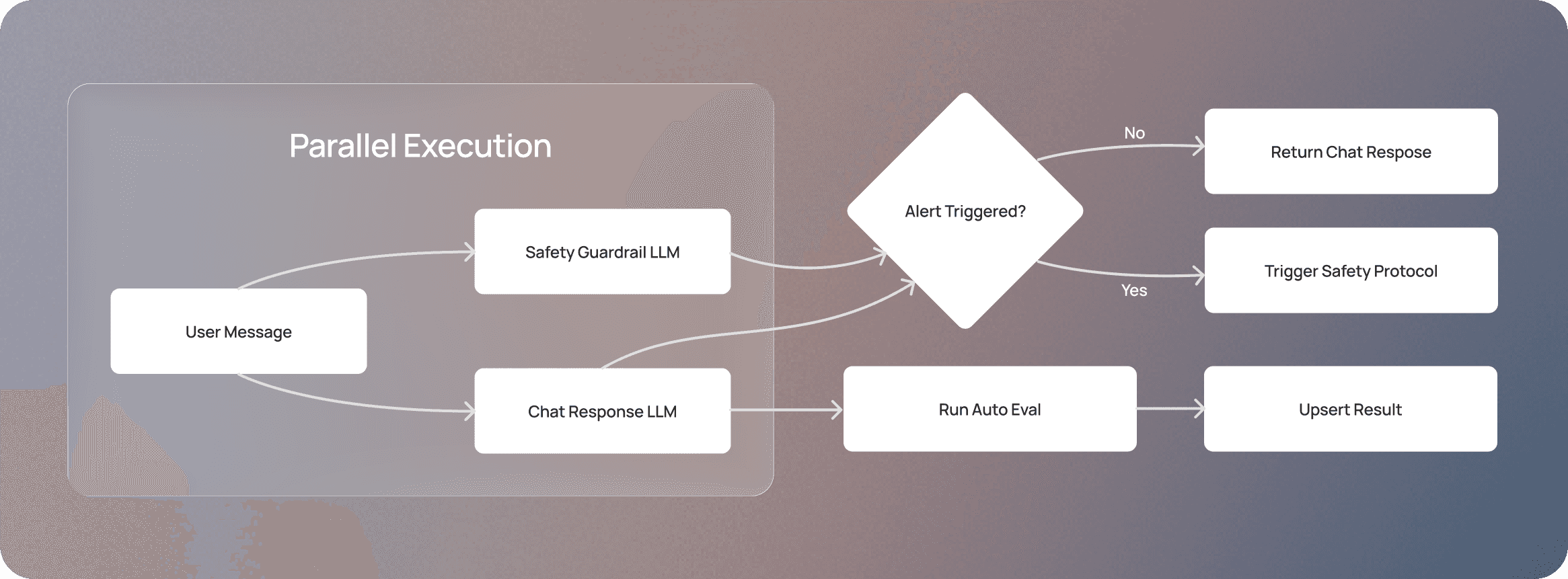
Rather than keeping our safety guardrail embedded in the main system prompt (which determines the chat response), we moved the guardrail into a separate, dedicated LLM call that runs in parallel with the main system prompt. As a result, the chat response is returned to the user only after the guardrail runs successfully and detects no signs of a client in crisis. If the guardrail fails to run at all, the conversation is paused until it can run reliably again. Because both calls run concurrently, the guardrail adds no significant latency to the user experience, but it does increase token usage. However, given the importance of client safety, we viewed this as a necessary trade-off to ensure we’re not leaving the execution of the safety guardrails to the main system prompt’s discretion.
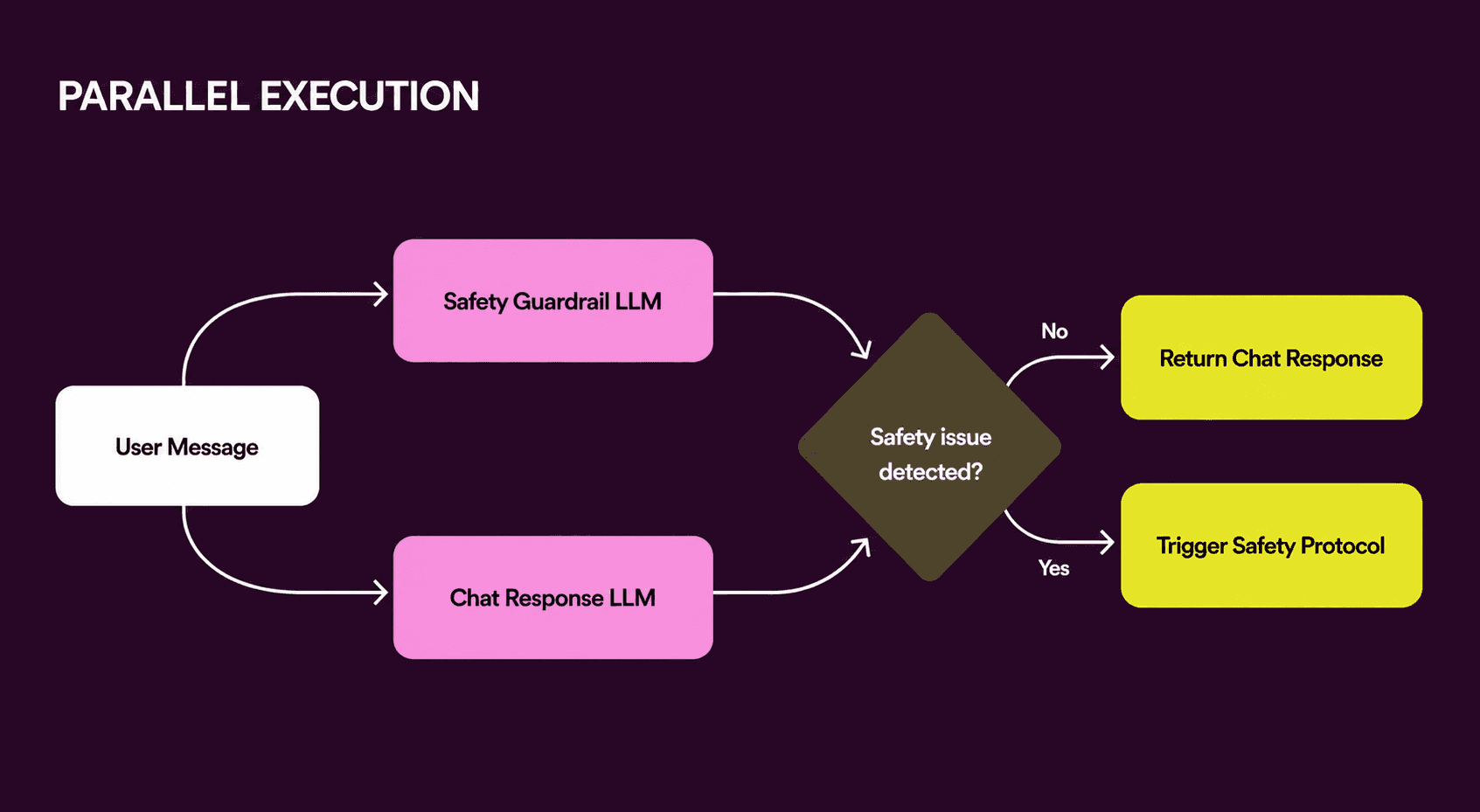
An overview of how the chat response and safety guardrail LLM work in parallel, balancing user experience with safety.
After extensive internal testing and external auditing of this advanced safety guardrail system, we had something we could implement with real clients. But turning a prototype into a shippable product meant adding two key features: 1) giving coach access to structured information so it could respond to common client queries (e.g., help center content) and 2) integrating it with our system so it could support administrative actions (e.g., adding topics requested by a client to their upcoming therapy appointment).
Moving towards our current architecture
Our first instinct was to consider a router/specialist-agent paradigm, where a classifier evaluates a user’s request and hands it off to the appropriate specialized agent (e.g., a help center agent to help users navigate the Grow platform or an appointment-scheduling agent to modify appointments).
While this approach would have worked, it came with significant user experience tradeoffs. Users come to coach to talk about their mental health, and trust is central to that experience. One way to build trust is by having a consistent tone across all coach interactions, whether someone is booking an appointment or processing a hard week. However, maintaining a consistent tone becomes harder as the number of agents grows, requiring us to replicate and evaluate tone across sub-agents.
Additionally, splitting key functionality across agents complicates our eval process — we'd need to assess each agent independently and then evaluate the end-to-end flow on top of that. Since the product is still evolving, we wanted a simpler eval system so our clinical and product teams could quickly spot and fix issues.
Finally, a router/orchestrator is another component to build, maintain, and debug. Given how quickly frontier models are improving, we believed specialized sub-agents would become less necessary over time for our use cases, making the added complexity harder to justify.
So, we decided to build on top of our existing LLM architecture and added two new elements: MCP tool calls that can be used by our main system prompt when relevant, and deterministic validation that verifies any action taken by those tool calls that touches real data.
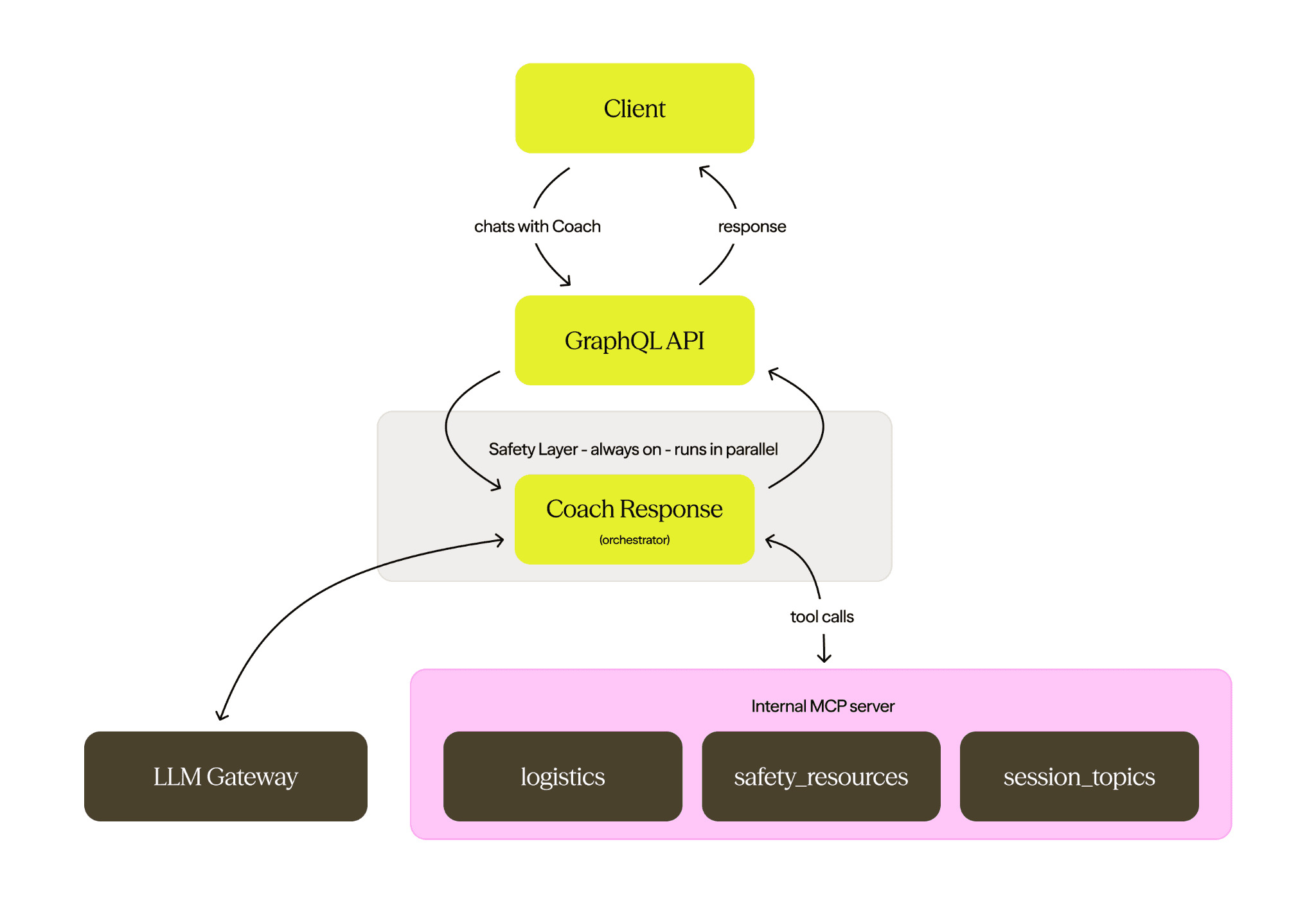
An overview of the coach architecture, including a detailed breakdown of our MCP server.
Building our MCP server and validation layers
The MCP server serves two purposes: it hosts critical resources and instructions that coach might need in specific situations (like sharing a domestic abuse hotline number for clients experiencing a possible intimate partner violence), and wraps our existing API endpoints so coach can execute administrative workflows (like adding requested topics for an upcoming appointment). This setup might sound similar to skills, since coach uses tools to fetch more context. However, framing these as tools gives us broader model support, as not all LLM providers support fetching skills via an API.
This approach also has several other benefits. It makes the system naturally extensible — we can add new tools to the MCP server to add new capabilities, without needing to rearchitect the core system. It also lets us use an LLM’s reasoning capabilities to decide when a tool call is actually needed based on relevant context. We considered using a RAG system (which we use for deterministic lookups like a client’s upcoming appointment), but for conversational and situational context — like which part of the Grow ecosystem a user is asking about — the model handles nuance better than vector search and can make that retrieval judgment on its own. Replicating that retrieval behavior with vector search would mean either triggering retrieval on every request or adding an orchestration layer to decide when to invoke it, and we didn’t think that complexity was warranted.
We also added a deterministic validation layer to check tool calls before they can affect the system state or the user experience. Our initial checks were pretty simple. For example, we added a fallback handler so that if the model calls a tool category that doesn't exist, the system returns a safe, generic response rather than failing for the user.
To make this layer more robust, we heavily relied on our online eval system to identify and fix new edge cases (another reason to keep them simple!). For instance, we noticed in evals that coach would often fail to add a newly requested topic to a user’s upcoming therapy appointment. Digging further, we realized this was because the session topic — which users suggested and coach reiterated back to the user — sometimes exceeded our character limits (LLMs are not always great at counting). Fortunately, when the API rejects a request, it returns a failure with a reason, which the model can interpret and act on. We implemented retry logic that passes this failure reason back to the model, prompting it to regenerate a shorter topic. This resolved the issue without compromising output quality.
Lessons for other teams
As we’ve scaled coach, this architecture has held up. We’ve seen a 20x increase in coach users over the last six months alone, including supporting tens of thousands of user-requested administrative actions. As we’ve done this, we’ve also prioritized safety — in QA of a subset of coach conversations, we’ve seen the guardrails fire correctly in 99% of cases.
That scale didn’t come from having all the answers upfront. We took an iterative approach, building the system piece by piece and matching each job to the control pattern it actually needs. Looking back, here are the main principles that encapsulate our thinking:
If a behavior requires guarantees, pull it out and run it independently rather than relying on the main LLM to handle it consistently.
If information is only sometimes relevant, use a tool call via an MCP server rather than loading everything into the prompt.
If an action changes the real system state, add a validation layer outside the LLM, rather than trusting the model to police itself.
Finally, building these components isn’t a one-off task. It's impossible to predict all failure modes in advance, so while it’s good to design for recoverability from the start (catch-all fallbacks, structured error responses, clear failure modes), expect to keep iterating as real usage surfaces what you couldn't anticipate.
—
If you’re interested in solving complex architectural problems with real user-facing impact, come work for us. Check out our open roles.
This post is the second of a two-part series on how we built coach. Part I covers how we designed coach to be a safe, clinically grounded experience for our clients.