Building coach: How we took a safety-first approach to AI in mental health.
AI & Machine Learning
·
6 min
Earlier this year, we launched coach, our AI tool that helps clients continue their mental health work between sessions. We knew clients were interested in using AI for mental health support — more than a third of Americans say they're comfortable doing so, drawn by the accessibility and ease of use of AI chatbots.
But there are real risks to using AI in mental health. LLMs are non-deterministic and can produce unexpected outputs. They often miss nuance, have limited context, and tend toward agreeableness that can quietly reinforce harmful self-beliefs. Building coach meant taking those risks seriously from the start. We designed it to support — not bypass — the client-provider relationship, which meant working hand in hand with clinicians to shape the experience and treating safety and privacy as first-class citizens.
Since launch, coach has facilitated over 100,000 client conversations with over 600,000 messages exchanged. Through this journey, we’ve learned that building AI products for mental health isn’t always about having the best new models, but about using the technology thoughtfully, deferring to clinical expertise, and never losing sight of the human behind the screen.
Meet coach
Coach is an AI tool that supports clients through their mental health journey, whether it’s reflecting on a recent session, flagging topics to discuss with their provider, practicing skills learned in therapy, or applying those skills to real-life challenges. Built into the Grow Therapy mobile app, coach is currently available to adult clients across most US states.
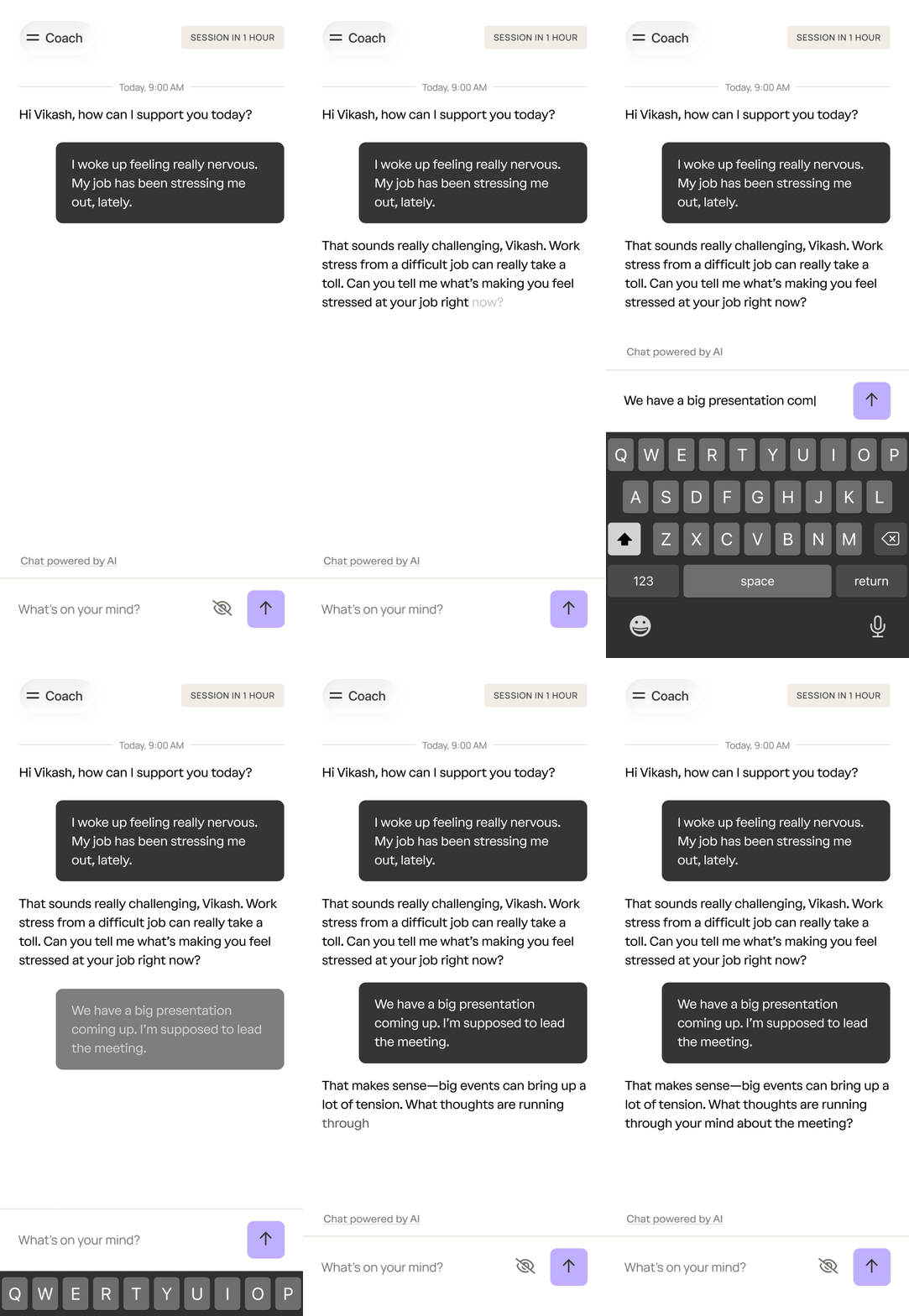
A sample interaction with coach.
What sets coach apart from general-purpose AI chatbots is how it’s intentionally designed to complement care. From the moment clients log on, they are given clear context on how to use coach and are told that they're talking to an AI, not a human or therapist. This clinical grounding also shapes who can access coach and when. Clients need an active or recent therapy appointment in the system to use coach, reinforcing that it is intended to support the care clients receive from their providers. Additionally, coach is available only to adults, since adolescent mental health presents unique sensitivities that it isn’t currently designed to address.
Coach is also deeply integrated with a client’s provider. Providers can view their clients’ coach conversations and use them to inform their sessions, creating a continuous thread between the work done in the room and outside it. They also retain full clinical control. If a provider determines that coach isn't the right fit for a particular client, they can turn it off at any time.
Coach’s architecture
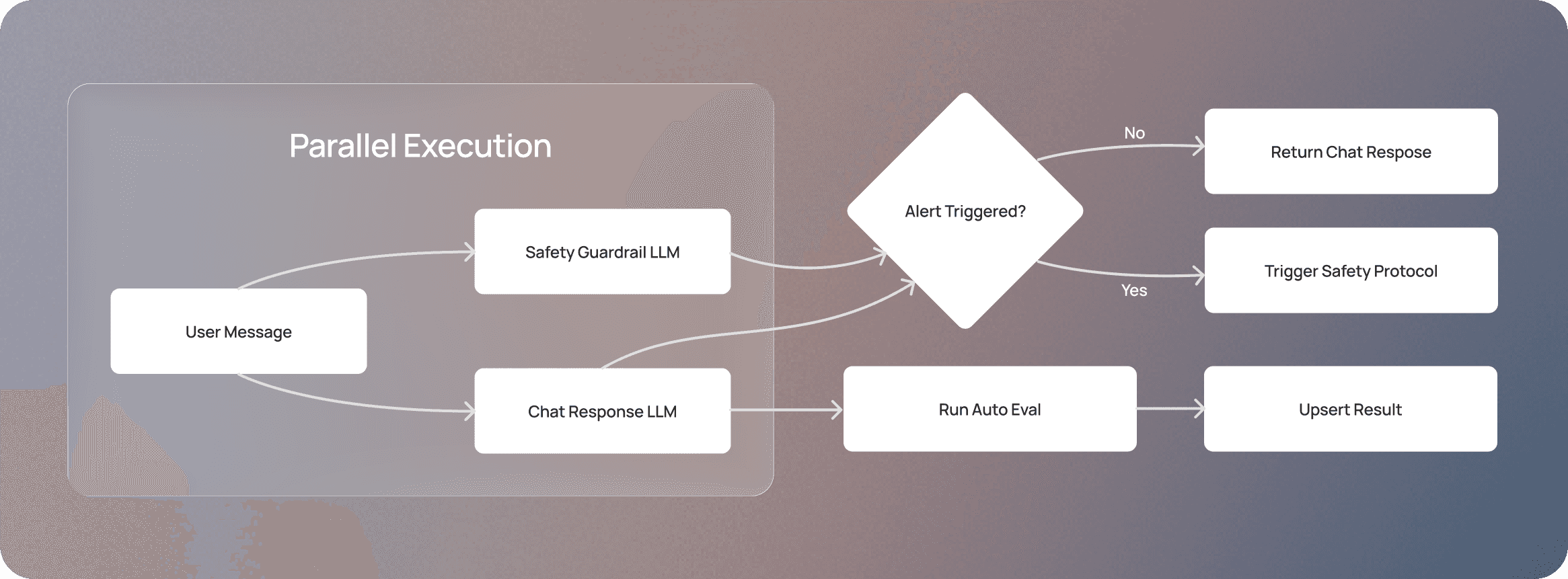
At a high level, coach is powered by two LLM calls running in parallel. The first generates coach's replies to clients, while the second is a dedicated safety guardrail that examines every client message in real time, monitoring for signs of elevated clinical need or potential safety concerns, such as self-harm, harm to others, or physical distress. Each LLM is primarily governed by a main system prompt that outlines its behavior. Context, such as past coach conversations or after-session summaries, is passed to the models at runtime.
We considered adding an upfront classifier alongside these parallel calls to categorize user queries, but the latency trade-off wasn't worth it at this time. Every additional LLM call introduces a delay we can't fully control, and we didn't want that affecting the client experience. (Stay tuned for Part II, where we will dive deeper into these architecture tradeoffs.)
We’ve also integrated coach with our internal MCP server, which includes tools for sharing safety resources with clients, instructions for guiding the conversation for specialized topics (e.g., relationship dynamics), creating session topics, and handling appointment logistics. All MCP requests occur on the LLM vendor's side — we pass it the relevant tool configurations and MCP server URLs. This approach allows us to quickly add new tools while still keeping our orchestration stack lean.
The LLM orchestration logic is built as a microservice outside our core monolith (except for the MCP server), keeping the system modular and response times fast. The system is also built with privacy in mind. All client messages with coach are encrypted, and we use zero data retention endpoints with our model providers to ensure no conversation data is stored or used for external model training. All third-party vendors with access to client coach data have signed business associate agreements (BAAs) to ensure they adequately protect user data and comply with HIPAA requirements.
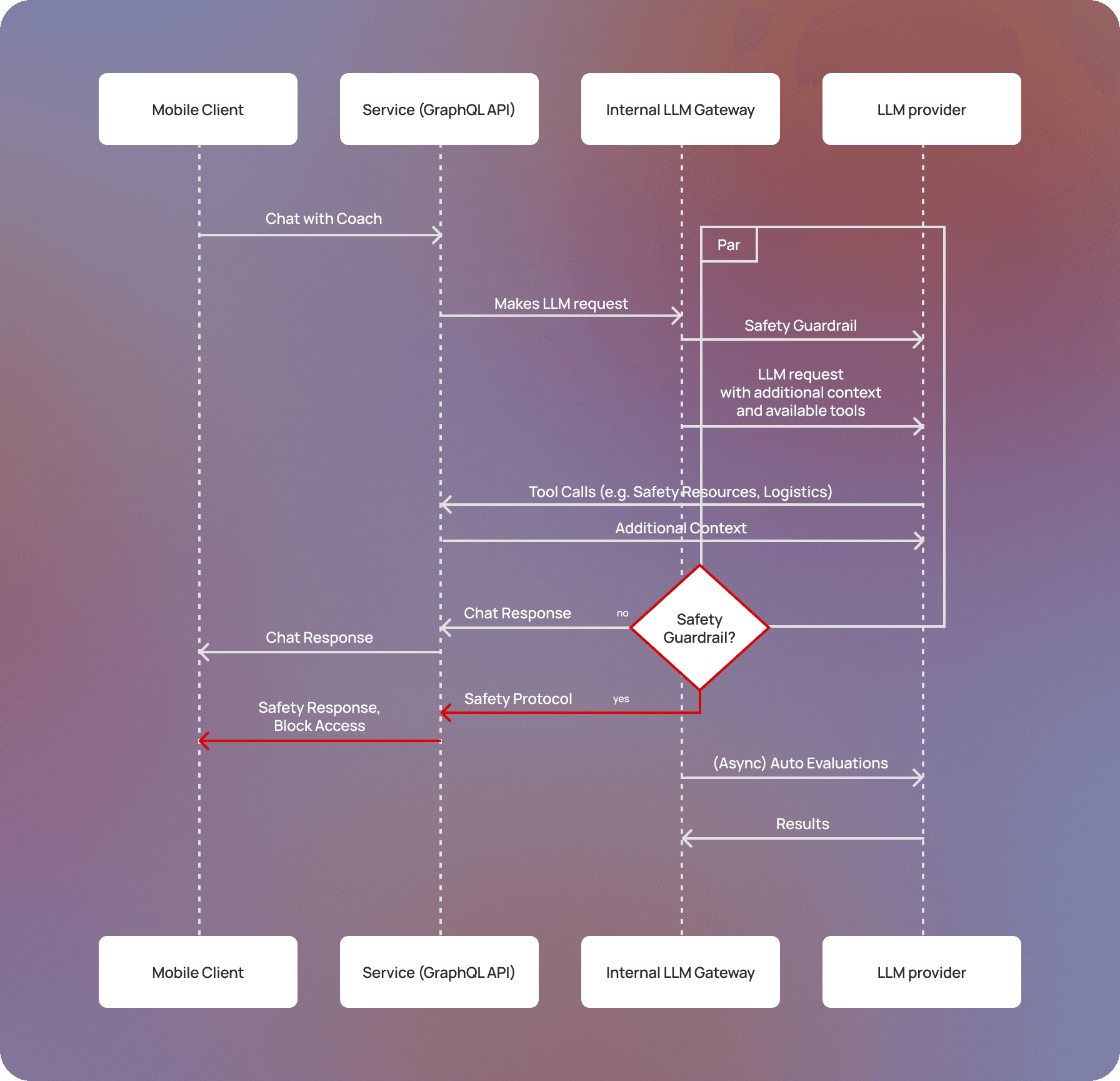
An architecture diagram for coach that traces the full lifecycle of a request.
Model selection
Our engineering team, in collaboration with our in-house team of clinicians, conducted extensive offline evaluations with a wide variety of off-the-shelf LLMs. The models we chose had the highest ratings for safety and user experience—they demonstrated strong safety behavior, high response quality, and fast response times for real-time conversation.
In the event of an outage at our primary model provider, we implemented a fallback mechanism that switches to an alternative provider. Our teams can trigger this fallback through a zero-downtime configuration change, ensuring infrastructure issues don't disrupt client access to coach.
Designing the experience: Clinicians in the loop
Most AI chatbots are shaped primarily by engineers. With coach, we took a different approach: licensed clinical therapists are embedded throughout the entire system, from the prompts to the evaluations that help improve them.
Prompt design
At the core of coach is a single main system prompt that governs how it responds in conversation. Rather than having engineers write this alone, our in-house team of clinicians authored key sections directly, including coach’s role definition, boundaries, and behavioral principles. These principles are grounded in evidence-based approaches like cognitive behavioral therapy (CBT), dialectical behavior therapy (DBT), acceptance and commitment therapy (ACT), and motivational interviewing. As the engineering team, we supported the clinical team with the technical implementation: structuring prompts for optimal LLM performance, managing variable injection to pass in key context, and ensuring instructions were clear and well-formed. We also built tooling to help the clinical team release different versions of the prompt and test them against live traffic in “shadow mode,” gathering data on the new version’s performance without impacting the client experience.
The prompt has evolved over time as we've learned more about how clients use coach. For certain use cases — like helping clients prepare topics for an upcoming appointment — we found it more effective to include dedicated instructions as a distinct section in the prompt, rather than relying on the model to infer the right behavior from general principles alone.
Sometimes, iterating on these prompts has required us to break out of our single-prompt architecture. For instance, we added a secondary prompt to personalize the opening message to inspire reflection and track progress. Now, when a client returns to coach, this prompt generates a personalized greeting based on previous conversations, like “How did that stressful meeting go?” if the client had last discussed preparing for a difficult conversation. Once the client replies, coach returns to the main prompt for the remainder of the exchange. We kept this as a separate prompt for a practical reason: it's only needed to generate that first message, and embedding it in the main prompt would add unnecessary context overhead for every subsequent response. This iteration reflects a broader lesson: building with LLMs isn't just about writing good prompts — it's also about knowing when the surrounding architecture needs to evolve.
Eval system
We built two complementary eval systems: an offline eval that tests prompts before they go live, and an auto eval that runs continuously on real conversations to catch behavioral issues, flag potential safety concerns, and surface opportunities to improve coach.
We evaluated several off-the-shelf solutions before deciding to build in-house. Most eval frameworks are designed to assess a single input against a single output, but coach has multi-turn conversations with a wide range of users across a wide range of emotional states. For our offline eval, we needed a way to simulate those conversations and evaluate coach's behavior across the full arc of an exchange.
Our offline eval system pairs two LLMs together: one plays the role of a client under various conditions (escalating distress, attempts to jailbreak the prompt, aggressive behavior), while the other runs the prompt being tested. A script cycles through a defined set of test cases over multiple turns, generating a library of realistic conversations. An LLM-as-a-judge evaluator then scores each conversation across 20 dimensions spanning coach’s behavior (e.g., using evidence-based skills, avoiding signs of sycophancy), the client's behavior (e.g., motivation, sentiment shifts), and safety. These scores are aggregated into a composite that reflects overall prompt performance, giving our clinical team the data they need to iterate quickly and determine whether a change is ready for production.
Auto evals score conversations using the same LLM-as-a-judge as our offline eval system. We score each response coach generates in real time and store it in our database. As the conversation progresses, the overall score is updated with the latest data. We use these scores to build dashboards that track coach’s performance and surface any opportunities for improvement, so our clinical team can quickly identify and make changes. As a result, we’ve built a direct feedback loop that helps us iterate on the main coach response prompt, the safety guardrail prompt, and the auto eval prompts themselves.
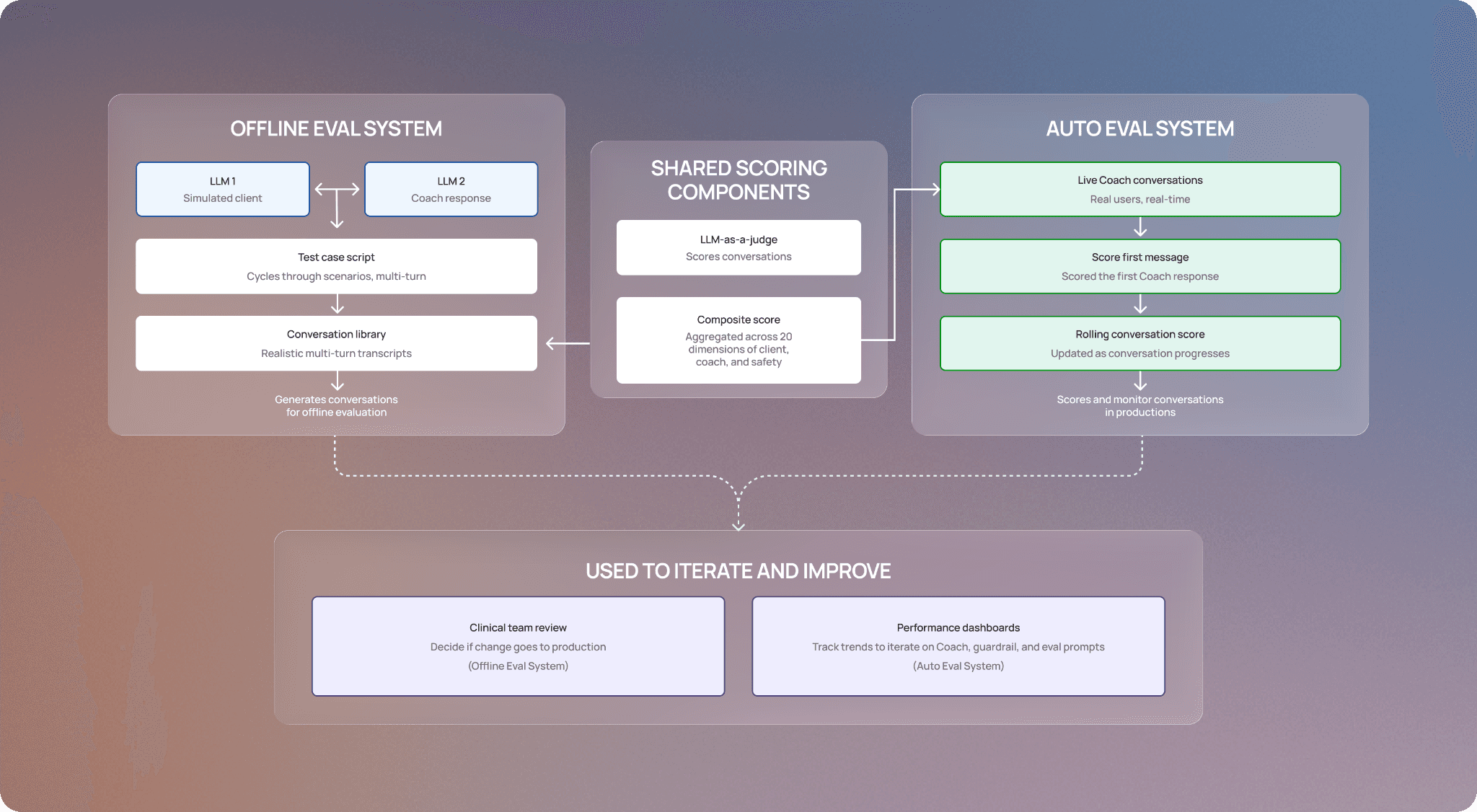
A visual representation of how our offline and auto eval systems work, how they’re used, and the shared components.
Keeping coach safe: Implementing safety guardrails
Clients who come to coach are sometimes in real distress. For example, they might be struggling with thoughts of self-harm or experiencing a medical emergency. In those moments, coach's job isn't to provide support; it's to recognize what's happening and route the client to the right human help as quickly as possible.
To get this right, we built coach's safety mechanisms to be far more robust than what you'd find in a typical AI chatbot. Our safety systems are designed to err on the side of caution — we’d rather occasionally frustrate a client by flagging a conversation that doesn’t need intervention than risk missing one that does. With this principle in mind, we designed our safety mechanism in layers so that if one layer misses something, another catches it.
When our safety tool system detects language indicating a client may be in moderate distress — situations where a client is struggling but not in immediate danger (e.g., coping with a gambling addiction) — coach surfaces targeted resources and asks structured follow-up questions, providing clients with a path to appropriate support. A targeted sample of these safety tool calls is reviewed by our clinical team to ensure coach is behaving as expected.
However, mental health situations are dynamic — what starts as moderate distress can escalate into something more serious. That's why we also have a safety guardrail that continuously monitors conversations for signs of elevated clinical need and safety crisis. When it fires, we initiate our safety protocol: we pause the conversation and connect clients to crisis resources — such as 988 or emergency services — so they can access help from a trusted professional. We also inform their provider about the crisis to ensure continuity of care. The provider can review the client's chats with coach (including what triggered the pause) and decide whether to re-enable the tool. Our clinical team conducts QA to confirm the guardrail system is working correctly; if it overfired, they can restore coach access and use the instance to recalibrate the prompt.
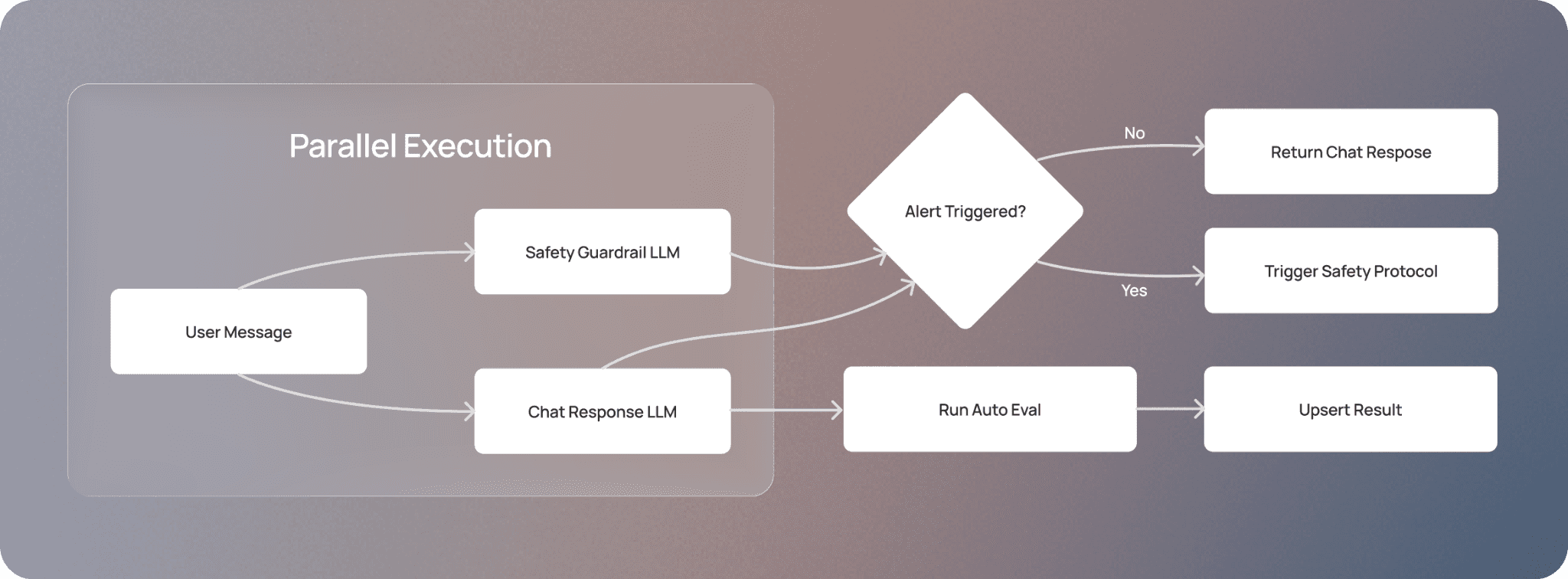
An overview of how the chat response and safety guardrail LLM work in parallel, balancing user experience with safety.
Our auto eval system serves as an additional layer, continuously scanning live conversations for safety concerns that the other layers may have missed. Any flagged conversation is escalated to our clinical team for additional review.
Finally, if a provider has concerns about their client's safety while using coach, they can turn off the tool at any time.
Looking forward
Coach has been available to nearly all of Grow’s clients for a few months, and we’re already seeing an impact. Thousands of clients use coach weekly, and our internal analysis found that in more than half of conversations, there’s a shift toward more positive or hopeful language by the end of the chat. And providers are also seeing the value too; in our surveys, over 80% of providers would recommend coach to their clients after trying out the tool. These results are encouraging and give us confidence that our approach to prioritize safety and clinical expertise is working.
But we know there’s more work to make coach an increasingly helpful tool, whether it’s making it easier to use or ensuring it returns more personalized responses. If you’re interested in building clinically grounded AI tools for healthcare, come join us. Check out our careers page for open roles.
This post is the first of a two-part series on how we built coach. In Part II, we’ll cover how we landed on our architecture in more detail–stay tuned.